Parametric
Shape buttons
Pick a shape and set its sliders instead of typing a formula.
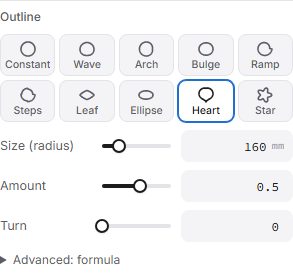
Formula fields (the fin length, height, twist and outline of Along a curve, and the Formula sources) show ten shape buttons: Constant, Wave, Arch, Bulge, Ramp, Steps, Leaf, Ellipse, Heart and Star.
- Sliders show only what changes the chosen shape: base, amount, waves (points for a star, steps for Steps), phase and ease.
- The formula the shape writes is under Advanced: formula. Type your own there; it shows as Custom formula and the buttons leave it alone.
- Draw by hand turns the field into points you drag up and down (out and in round an outline). Add or remove points, and choose Smooth or Straight between them.
- Advanced: formula shows what the formula makes (the relief from the front, or its curve) and says why when it can't be read. Tap a variable or a function to put it in at the cursor.
- Formulas are checked before they run: only maths, no code.