Parametric slicer for laser cut sculptures
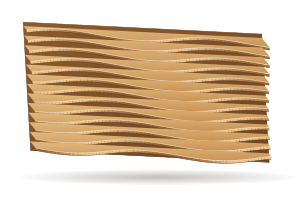
Slice a 3D model (STL or OBJ), a photo or a maths surface into flat layers that stack or slot together, then cut them from plywood or cardboard. Choose stacked slices, interlocking grids or radial slices, set the sheet thickness, and the parts are numbered and nested for cutting.
Pro is required to save and export this generator. Free can preview it.
How to use it
- Open the generator and pick a preset, or start from the defaults.
- Set the size, material thickness and kerf. Run the checks before you cut.
- Look at the sheet and the 3D view. Export is available on Pro.
Files for your laser
Prepare SVG and DXF files for cut, score and engrave operations.
Download SVG, DXF, PDF, PNG and LightBurn (.lbrn2), sized in millimetres or inches, with cut, score and engrave lines on separate colours. Materials: plywood (birch, basswood, poplar), MDF, solid wood, acrylic (cast and extruded), cardboard, paper and cardstock, leather and felt.
- LightBurn: Open the .lbrn2 file with separate cut, score and engrave layers, or import SVG or DXF. Review speed and power for your machine and material before running the job.
- xTool Studio and Creative Space (XCS): Import an SVG or DXF, check the dimensions and assign the coloured paths to cutting, scoring or engraving. Choose settings for your xTool machine and material in its software.
- Glowforge: Upload the SVG or PDF; each operation is its own colour, so the Glowforge app lists cut, score and engrave steps.
- Cricut Design Space: Upload the SVG for paper layers, cards, pop-ups and shadow boxes cut on a Cricut Maker or Explore.
- Inkscape, Illustrator and CorelDRAW: Open the SVG, PDF or DXF to edit further; lines keep their real size in millimetres or inches.
- Other CO2, diode and fiber lasers: OMTech, Thunder Laser, Epilog, Trotec, Ortur, Atomstack, Creality Falcon, Sculpfun and others: use DXF or SVG in the machine's own software.
Machines and software HingeLab works with · Laser cutting glossary · Laser cut files and templates
Questions
Which 3D files can I slice?
STL and OBJ models, as well as photos (as a depth relief) and formula surfaces.
Is the parametric slicer generator free?
You can design and preview for free in your browser, with nothing to install. Saving projects and downloading the cut files are part of HingeLab Pro.
Which file formats can I download?
SVG, DXF, PDF, PNG and LightBurn (.lbrn2). Cut, score and engrave lines are on separate colours and layers.
Does it work with my laser?
Yes. The files open in LightBurn, xTool Creative Space, the Glowforge app, Inkscape, Illustrator and CorelDRAW, and work with CO2, diode and fiber lasers.
Start from what you are making
Use LED bulbs only in wooden shades, and keep the wood well clear of the bulb.
Source model
Set the size fixes the model's width, height or depth. For an imported 3D file, Turn X, Y and Z rotate it before slicing.
Shape buttons
Formula fields (the fin length, height, twist and outline of Along a curve, and the Formula sources) show ten shape buttons: Constant, Wave, Arch, Bulge, Ramp, Steps, Leaf, Ellipse, Heart and Star.